
Why a rubric passes or fails
How items, sections, and mandatory rules combine into the pass or fail result of a rubric, with examples you can try.
For learners and educators
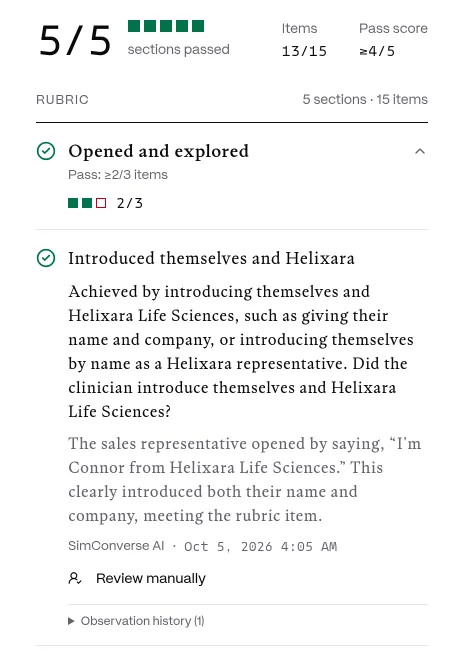
A rubric result is decided at two levels. Each section passes or fails on its items, and the rubric passes or fails on its sections. A learner can therefore pass most items and still fail, because one mandatory item or section was not met.
Authors mark an item or a section as Mandatory in the rubric editor. Attempt results, and the examples on this page, show the same thing as Required.
The rubric passes when enough sections pass
Section titled “The rubric passes when enough sections pass”A rubric passes when the learner passes at least the number of sections set in the rubric’s Passing Score (Minimum Passing Sections in the rubric editor). If a section is Mandatory, that section must pass too. A rubric fails if a mandatory section fails, even when enough other sections pass. The result then shows Required section not met.
In the example below, the learner needs to pass 2 of the 3 sections, and Section 1 is mandatory. Select each example to see how the rubric result changes. Select Replay to see the results appear again.
Rubric
2 / 3The rubric passes. The learner passed 2 of 3 sections, and the mandatory section.
Rubric
Awaiting resultsRubric
Awaiting resultsA section passes when enough items pass
Section titled “A section passes when enough items pass”A section passes when the learner passes at least the number of items set in the section’s Passing Score. If an item is Mandatory, the learner must pass it too. A section fails if a mandatory item fails, even when enough other items pass. The section then shows Required item not met.
In the example below, the learner needs to pass 3 of 4 items. Item 2 is mandatory. Select each example to see how the result changes.
Section 1 passes. The learner passed 3 of 4 items, and the mandatory item.
These are sample results. On a real attempt, the item and section counts come from the rubric the activity uses, and results can appear one by one while grading finishes.
Change the pass marks, feedback language, or manual results
Section titled “Change the pass marks, feedback language, or manual results”Authors set Mandatory, pass marks, and the rubric feedback language (English, Spanish, French, or German) in the rubric editor, under Author > Rubrics. Reusable sections are under Author > Sections. A new version of the rubric is created when you save a change, and existing assignments stay on the version they have.
The heatmaps in Insights show how a cohort did on each section and item, which is the evidence to look at before you move a pass mark. On an individual learner attempt, Managers and Admins can also use Review manually or Regrade item—see Speed review and manual grading.